For now the beam and pretty much the entire MM engine playfield seems to be hardcoded to not go beyond R'n'D vanilla window boundaries and just pretty much doesn't exist for the game.
That might also mean that, for example, Android viewport for MM/DF will probably look broken in current versions, but I'll have to double check that.
[MM] Hardcoded boundaries
Moderators: Flumminator, Zomis
- TheOnyxGuy
- Posts: 676
- Joined: Wed Oct 30, 2013 5:32 am
- Location: Russia
- Contact:
[MM] Hardcoded boundaries
Previously known as Eizzoux (boooo)
Re: [MM] Hardcoded boundaries
I have tested this with a "large screen" graphic set, and apparently it works just fine for me when playing oversized MM style levels! 
May it be possible that there is some bug in the "playing" viewport of the graphic set you have used? (Although I can perfectly imagine that this is a bug in the program, of course.)
Please check this issue with level 001 of the attached small level set (and feel free to attach your own level or artwork set that shows the described problem).
May it be possible that there is some bug in the "playing" viewport of the graphic set you have used? (Although I can perfectly imagine that this is a bug in the program, of course.)
Please check this issue with level 001 of the attached small level set (and feel free to attach your own level or artwork set that shows the described problem).
- Attachments
-
- test_custom_viewport_4_large_2.zip
- (2.65 KiB) Downloaded 980 times
- TheOnyxGuy
- Posts: 676
- Joined: Wed Oct 30, 2013 5:32 am
- Location: Russia
- Contact:
Re: [MM] Hardcoded boundaries
Weirdly, only later I revisited the levelset I executed that in, and the issue is not relevant anymore, although I still don't know the exact reason why it suddenly stopped such behavior despite lack of my inputs in that. And it wasn't just a one-time issue, I had it after reloading the game, reentering the levelset, and it would occur each time. I had a suspicion that it might be some weird issue with playfield viewport overriding the door 1 viewport, because in that levelset they're placed right next to each other, but there was no override. I didn't even change anything and just left it be afterward, and then recently I revisited and, yeah, it works as intended now.
And, I guess, about the levelset itself, I intent to make it a little bit of the opposite of Reflektor, although I actually started making it before I started making Reflektor (the first time, when I lost both). Whilst Reflektor is a bit more friendly, relatively simple and overall pretty small levelset, this one I want to make a bit more... rough. The huge unforgiving mess of puzzles that also give you very little time to work with, irritating menu, huge screen where you can see everything but in a very small scale, even some screens will be blocked off completely... Overall very rude and repulsive pack with 10 levels. Yeah, weird intentions, but not really sure if I will develop it much further anyways.
Previously known as Eizzoux (boooo)
- TheOnyxGuy
- Posts: 676
- Joined: Wed Oct 30, 2013 5:32 am
- Location: Russia
- Contact:
[4.4.1.3] Bigger playfield in MM engine may just cut off at vanilla size [revisiting old topic]
Okay, returning to this topic again, because there is still something wrong with MM engine's playfield rendering behavior. In short, when I'm working on something, I usually keep the levelset I'm working on as last visited, ya know... The usual. Anyways, the levelset has bigger window and bigger playfield than the vanilla boundaries. Other engines seem to work just fine, no mishaps, no weirdness... Mirror Magic engine for some reason cuts off like this:
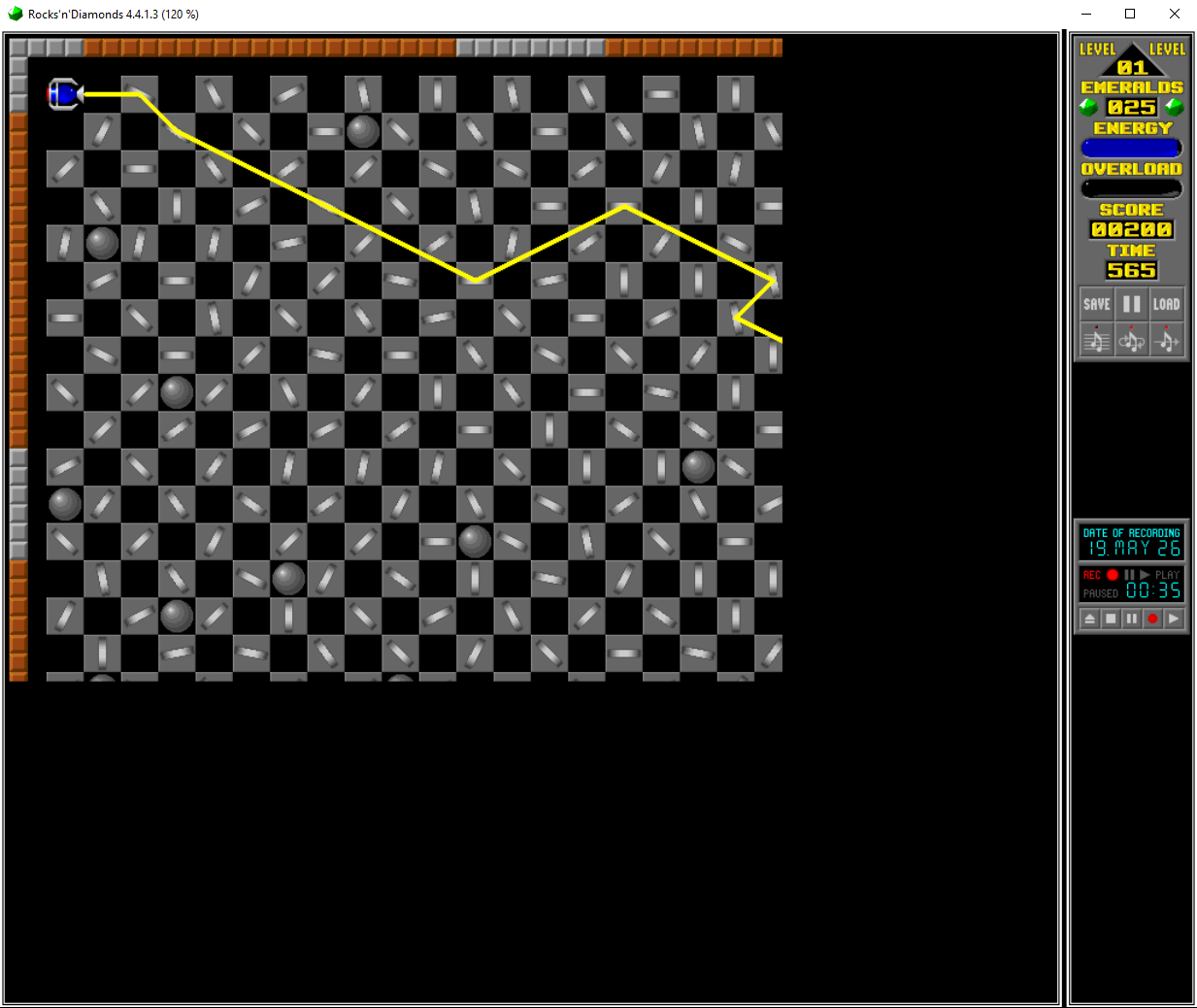
What's pretty interesting is that the playfield cuts off EXACTLY where vanilla game's window boundaries usually end - at 672x560.
I spent, like, a few hours observing what may be wrong, maybe I have to add some seemingly unnecessary attributes... Nah, doesn't seem to change anything... It took me quite some time just writing useless lines and reopening the game to find out this changes nothing.
That is, until I just randomly decided to switch to a different levelset with different viewport sizes and then switch back. And suddenly...
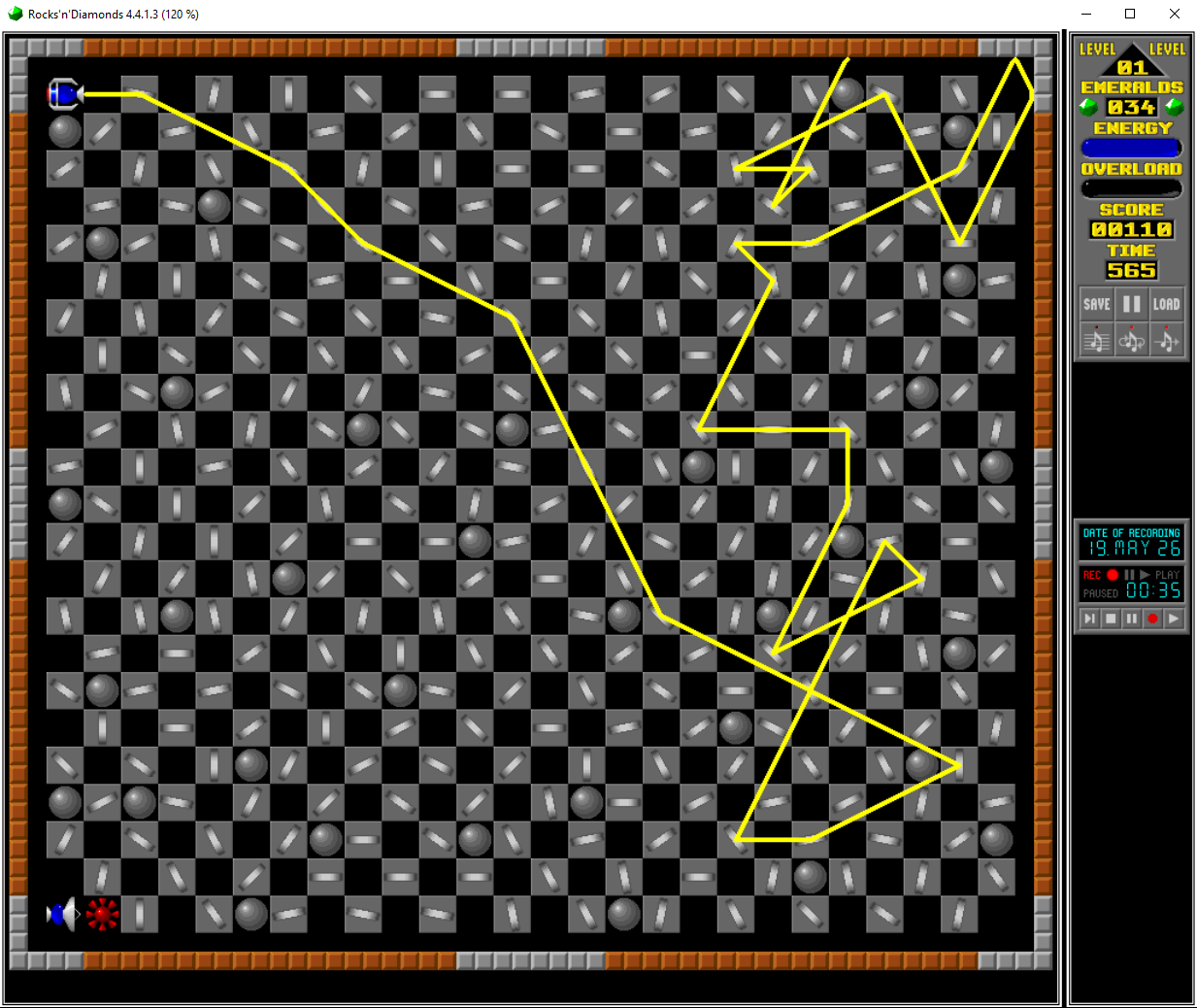
I genuinely don't know what exactly causes this, perhaps the game somehow forgets to register graphics beyond the vanilla window size, but what's even weirder, is that the main reason I was trying to fix that manually because I technically did that already, somehow. To be more precise, in the very levelset I've shown the screenshot of in the topic itself, I just managed to fix that cut off absolutely randomly, oblivious to what the hell did I even change to cause it to render properly. No matter if you just load the game with it being last visited levelset or load the levelset while being primarily loaded in some other one... Doesn't matter, no visual artifacts what-so-ever, as if that wasn't a thing to begin with. But then you load up the one on previous screenshots... It does render properly when loading from another levelset, but not when launching the game with it preloaded.
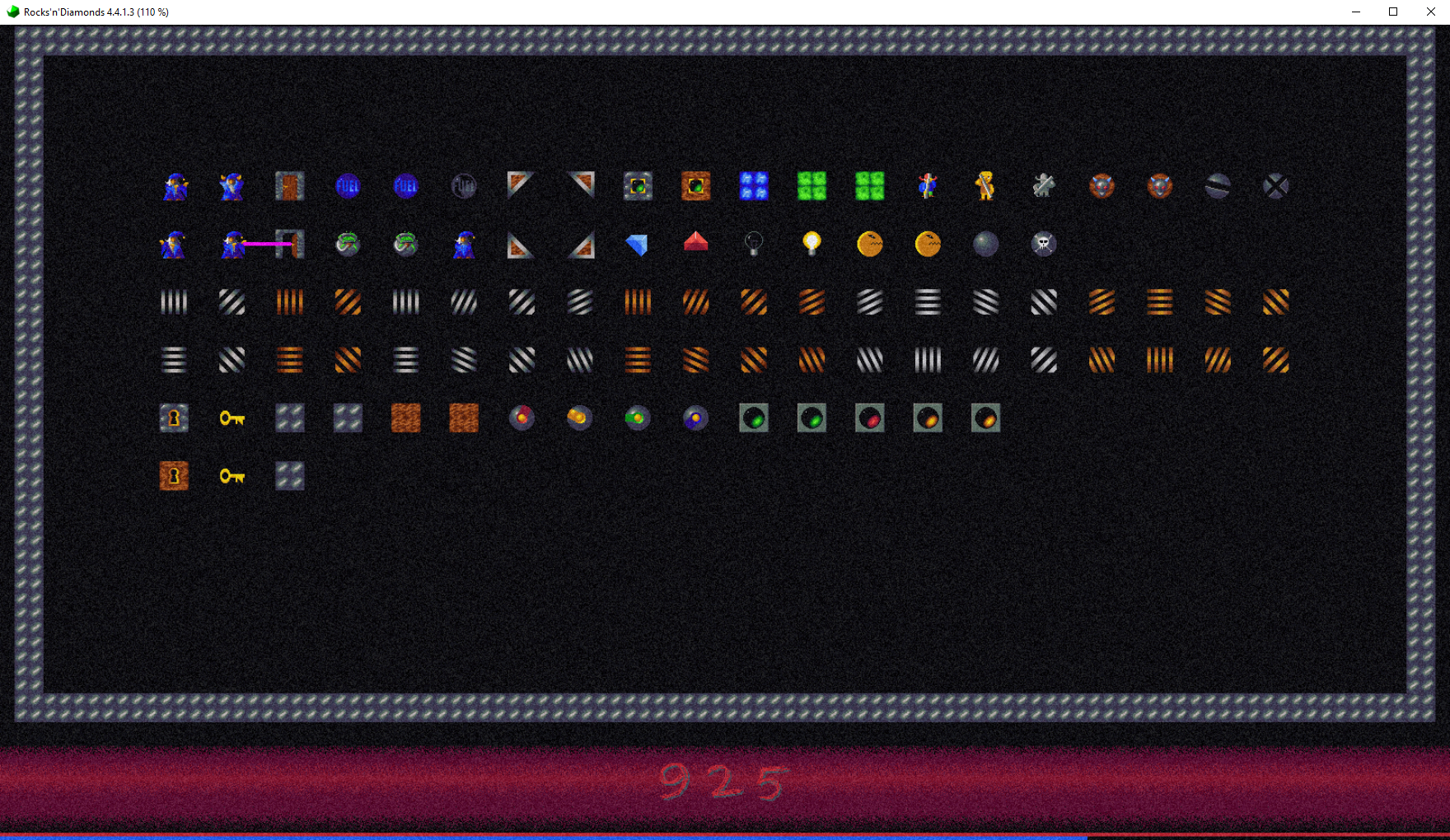
Just in case, here's that levelset from the first two screenshots. Just try playing around with it yourself.
Addendum: Oh yeah, I'm not sure if I mentioned that anywhere, but try to click around on different spots of any mirror, for some reason their click boxes seem to be off by, like, half a tile for some reason.
What's pretty interesting is that the playfield cuts off EXACTLY where vanilla game's window boundaries usually end - at 672x560.
I spent, like, a few hours observing what may be wrong, maybe I have to add some seemingly unnecessary attributes... Nah, doesn't seem to change anything... It took me quite some time just writing useless lines and reopening the game to find out this changes nothing.
That is, until I just randomly decided to switch to a different levelset with different viewport sizes and then switch back. And suddenly...
I genuinely don't know what exactly causes this, perhaps the game somehow forgets to register graphics beyond the vanilla window size, but what's even weirder, is that the main reason I was trying to fix that manually because I technically did that already, somehow. To be more precise, in the very levelset I've shown the screenshot of in the topic itself, I just managed to fix that cut off absolutely randomly, oblivious to what the hell did I even change to cause it to render properly. No matter if you just load the game with it being last visited levelset or load the levelset while being primarily loaded in some other one... Doesn't matter, no visual artifacts what-so-ever, as if that wasn't a thing to begin with. But then you load up the one on previous screenshots... It does render properly when loading from another levelset, but not when launching the game with it preloaded.
Just in case, here's that levelset from the first two screenshots. Just try playing around with it yourself.
Addendum: Oh yeah, I'm not sure if I mentioned that anywhere, but try to click around on different spots of any mirror, for some reason their click boxes seem to be off by, like, half a tile for some reason.
Previously known as Eizzoux (boooo)
Re: [MM] Hardcoded boundaries
Thanks a lot for your example level set!
Using this set and your detailed instructions, it was easy to reliably reproduce this bug -- debugging and fixing it was then just some hours of hard work (because it was hidden deeply in the old, nasty MM engine code). (It was caused by recreating drawing buffer bitmaps using wrong (outdated) values after screen size changes. The integration of the MM engine code into R'n'D is really nothing to be proud of, to be honest.
)
I think there's also a little bug in the "graphicsinfo.conf" of your example level set: "viewport.playfield.y" should be "8" instead of "6", else there are unused screen areas. It works like this: "viewport.playfield.y" + "viewport.playfield.height" + "viewport.playfield.y" should be "viewport.window.height" to have the playfield vertically centered on the screen (window). I think I know why you used "6" instead of "8": "viewport.playfield.border_size" is not added here, but is part of the "viewport.playfield.height" (to have a little empty border around the playfield, but this border is part of the viewport).
See the classic default artwork for an example:
"viewport.window.height" is "560" here, with "viewport.playfield.y" being "6" and "viewport.playfield.height" being "548", so 6 + 548 + 6 == 560, so the playfield is vertically centered. Independently from these values, a value of "2" for "viewport.playfield.border_size" adds a little border, so the usable playfield is 548 - 2 - 2 == 544, which is enough room for 17 * 32 tiles.
And while I was at it: The info text at the bottom of the screen in the level editor damaged the bottom screen border in your example level set, which is not your fault, but another programming error I also fixed.
All these fixes will be available with the upcoming new version 4.4.2.0 (hopefully soon).
Using this set and your detailed instructions, it was easy to reliably reproduce this bug -- debugging and fixing it was then just some hours of hard work (because it was hidden deeply in the old, nasty MM engine code). (It was caused by recreating drawing buffer bitmaps using wrong (outdated) values after screen size changes. The integration of the MM engine code into R'n'D is really nothing to be proud of, to be honest.
I also fixed that one. This was caused by totally broken playfield centering code. (Yes, if the MM playfield is smaller than the screen, it should be centered, but this was only halfway implemented so far, causing clicks partially going to the wrong tiles.)Addendum: Oh yeah, I'm not sure if I mentioned that anywhere, but try to click around on different spots of any mirror, for some reason their click boxes seem to be off by, like, half a tile for some reason.
I think there's also a little bug in the "graphicsinfo.conf" of your example level set: "viewport.playfield.y" should be "8" instead of "6", else there are unused screen areas. It works like this: "viewport.playfield.y" + "viewport.playfield.height" + "viewport.playfield.y" should be "viewport.window.height" to have the playfield vertically centered on the screen (window). I think I know why you used "6" instead of "8": "viewport.playfield.border_size" is not added here, but is part of the "viewport.playfield.height" (to have a little empty border around the playfield, but this border is part of the viewport).
See the classic default artwork for an example:
"viewport.window.height" is "560" here, with "viewport.playfield.y" being "6" and "viewport.playfield.height" being "548", so 6 + 548 + 6 == 560, so the playfield is vertically centered. Independently from these values, a value of "2" for "viewport.playfield.border_size" adds a little border, so the usable playfield is 548 - 2 - 2 == 544, which is enough room for 17 * 32 tiles.
And while I was at it: The info text at the bottom of the screen in the level editor damaged the bottom screen border in your example level set, which is not your fault, but another programming error I also fixed.
All these fixes will be available with the upcoming new version 4.4.2.0 (hopefully soon).
- TheOnyxGuy
- Posts: 676
- Joined: Wed Oct 30, 2013 5:32 am
- Location: Russia
- Contact:
Re: [MM] Hardcoded boundaries
What do you think of the fact that one of my MM levelsets does NOT have this glitch occur? Here are the viewport attributes of that levelset, just in case:Holger wrote: ↑Fri May 29, 2026 7:07 pm Using this set and your detailed instructions, it was easy to reliably reproduce this bug -- debugging and fixing it was then just some hours of hard work (because it was hidden deeply in the old, nasty MM engine code). (It was caused by recreating drawing buffer bitmaps using wrong (outdated) values after screen size changes. The integration of the MM engine code into R'n'D is really nothing to be proud of, to be honest.)
Code: Select all
viewport.window.width: 1600
viewport.window.height: 900
viewport.playfield.x: 0
viewport.playfield.y: 0
viewport.playfield.width: 1600
viewport.playfield.height: 900
viewport.playfield.border_size: 0
viewport.playfield.PLAYING.x: 14
viewport.playfield.PLAYING.y: 0
viewport.playfield.PLAYING.width: 1572
viewport.playfield.PLAYING.height: 796
viewport.playfield.PLAYING.border_size: 2
viewport.playfield.EDITOR.x: 14
viewport.playfield.EDITOR.y: 0
viewport.playfield.EDITOR.width: 1572
viewport.playfield.EDITOR.height: 796
viewport.playfield.EDITOR.border_size: 2
viewport.door_1.x: 0
viewport.door_1.y: 1000
viewport.door_1.width: 1600
viewport.door_1.height: 104
viewport.door_1.border_size: 0
viewport.door_1.PLAYING.y: 796
viewport.door_1.EDITOR.y: 796
viewport.door_2.x: 0
viewport.door_2.y: 1200
Previously known as Eizzoux (boooo)